- OfflineLocal assets, no CDN.
- VersionedRelease history stays browsable.
- KaTeXMathematics renders locally.
- Pascal-readyMade for FP and Lazarus docs.
Map the systems, scripts, databases, files and APIs hidden inside your integration estate — then see what could break when something changes.


📚 Documentation · 🧭 Northstar walkthrough
You inherited a folder of PowerShell jobs, a database nobody understands, three CSV exports that feed systems you have never seen, and a note that says ”don’t touch the student export”.
Integration Atlas reads those artefacts and reconstructs the map — with evidence for every edge — so you can answer the question that actually matters:
If I change
Student.Person.StudentID, what breaks?
🏠 Local-first. 🚫 No agents, no telemetry, no Kubernetes. Running Atlas locally does not require admin access when you can read the files you scan. Collecting complete scheduler data from source servers may require administrator or root access; see the server collection guide.
😵 The problem
Enterprise integration knowledge lives in scripts, not documentation.
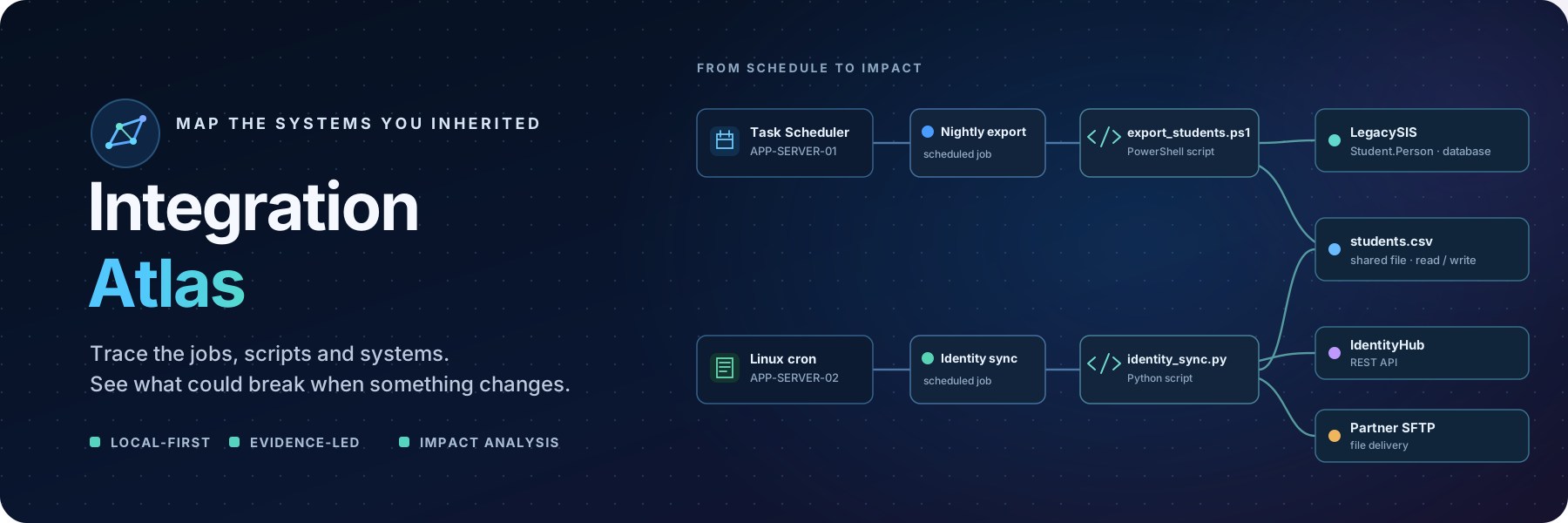
- The scheduler export names a script. The script queries a table. The table feeds a file. The file goes over SFTP to a vendor. Nobody wrote it down.
- Two unrelated integrations quietly consume the same CSV.
- A server is referenced by seventeen jobs and appears in no runbook.
- Every change is a guess about blast radius.
Static analysis of the artefacts you already have recovers most of that map.
⚙️ How it works
Discover → Extract → Normalise → Link → Visualise → AnalysePoint it at a folder. It walks the tree, hands each file to the scanners that claim it, turns observations into entities and relationships with evidence, and renders the result as an interactive dependency graph.
🧊 Everything is static. Nothing is executed, nothing is uploaded.
✨ Features
🧭 Discovery — Python, PowerShell, SQL, JSON, YAML, XML, INI, .env, Windows Task Scheduler exports and cron. Finds embedded SQL, HTTP calls, file IO, connection strings, UNC paths, hostnames and scheduler entries.
🔎 Evidence, everywhere — every relationship shows the file, the line and the redacted snippet that produced it. If Atlas says nightly-export.ps1 READS FROM Student.Person, you can see line 87 and the query.
🎯 Honest confidence — Confirmed, High, Medium, Low, Manual. No relationship is asserted without provenance, and you can confirm or reject what it finds.
💥 Impact analysis — select an entity, get the blast radius: the integrations, scripts, jobs, files and external services downstream of a change, with representative end-to-end flows.
🧵 Dependency paths — ask how LegacySIS reaches EnrolmentPortal and get the actual chain, highlighted on the graph.
⚠️ Explainable risk — hard-coded credentials and IPs, UNC paths, deprecated hosts, missing owners, undiscovered dependencies, dependency concentration. Every finding names its rule and explains itself. No opaque scores.
🔒 Secret redaction — credentials are detected and masked at the parser boundary. Nothing sensitive ever reaches the database, the logs or an export.
♻️ Rescans that respect your work — reconciles by natural key, reports what added/changed/removed, never overwrites manual edits, and retires discoveries that a scan confirms are gone.
🖥️ Multi-server provenance — collect each machine into a bundle with a server.json manifest and Atlas scopes its tasks and local scripts to that execution server, so identical names on different hosts never merge. See docs/server-bundles.md.
🚀 Quick start
git clone https://github.com/ikelaiah/integration-atlas.git
cd integration-atlas
Docker is optional. For a local install, you need Python 3.11 or newer. To open the web interface, also install Node.js 22 or newer. If you only need the CLI, you can skip the frontend build steps below.
Windows (PowerShell):
py -3.11 -m venv .venv
.\.venv\Scripts\Activate.ps1
python -m pip install -e .
macOS or Linux:
python3.11 -m venv .venv
source .venv/bin/activate
python -m pip install -e .
To build the web interface, run these commands from the project root:
npm --prefix frontend ci
npm --prefix frontend run build
Now load the sample estate and start Atlas:
atlas demo                         # load the Northstar demo estate
atlas serve                        # open http://localhost:8000
To scan your own files instead, keep them together in a folder and run:
atlas scan run ./my-integrations --workspace "Student Systems"
atlas serve
On a new database, the web app asks whether to explore the Northstar demo or scan your own folder; it loads nothing until you choose. Northstar lives in its own demo workspace, and your scans always go into a workspace of your own, so sample data never mixes with your estate. Switch workspaces from the sidebar; Atlas remembers your choice. Settings → Reset demo estate restores the demo and never deletes scan results.
In the web app, open Scans, enter a folder, choose an existing workspace or name a new one, and choose Preview scan. The preview lists proposed additions, updates and retirements without changing anything, including creating the workspace. Choose Apply scan to scan the current files and save the actual result in scan history. Open Review to inspect relationship evidence and confirm or reject discoveries. Select an entity in Atlas and choose Edit to correct its description, owner, technology, location or environment. These manual fields and review verdicts survive later rescans. Compare saved graph states in Compare graph history to understand the net changes across scans. See the review workflow and comparison guide for guided examples.
🎨 Frontend development
cd frontend
npm install
npm run dev                        # http://localhost:5173, proxies /api to :8000
For frontend development with hot reload, run npm --prefix frontend run dev from the project root. The web interface opens at http://localhost:5173 and uses the local Atlas API on port 8000.
🎓 The demo estate
atlas demo loads Northstar Education Group — a fictional education group built to look like a real one: a legacy DB2 student information system, a modern enrolment portal, a finance ERP, SaaS systems, Windows scheduled jobs, cron jobs, CSV drops over SFTP and REST integrations.
It includes the story this tool exists for:
LegacySIS (DB2)
  └── Student.Person.StudentID
        ↓
  student_extract.sql
        ↓
  export_students.ps1  →  students.csv
                              │
              ┌───────────────┼────────────────┐
              ↓               ↓                ↓
      identity_sync.py   nightly_sync.py   learningcloud_export.ps1
              ↓               ↓                ↓
        IdentityHub     EnrolmentPortal    LearningCloud
Two independent integrations consume the same CSV. Select StudentID, press Impact analysis, and see 39 downstream entities across 6 integrations — the kind of dependency that is never in the documentation.
⌨️ CLI
atlas init                         # create the local database
atlas demo                         # load the demo estate
atlas scan run ./integrations      # discover from a folder
atlas status                       # workspace and estate totals
atlas impact StudentID             # what breaks if this changes?
atlas impact --json StudentID      # machine-readable
atlas export -f json -o out.json   # json | csv | graphml
atlas export -f mermaid -o atlas.mmd  # Mermaid diagram
atlas export -f plantuml -o atlas.puml # PlantUML diagram
atlas serve                        # start the web application
impact and export use the oldest workspace unless you pass --workspace <slug>, and print which one they used. atlas status lists the slugs. atlas scan run --workspace accepts an existing workspace’s id or slug, or a new name, and refuses the demo workspace.
In Atlas, combine node type, environment, confidence, relationship type, review status and text search to narrow the graph. Find path searches the whole active workspace and explains the direction of influence. Use Export to download the filtered graph as Mermaid or PlantUML. The navigation and sharing guide walks through the Northstar example.
🔍 Supported scanners
| Artefact | Status | Detects |
|---|---|---|
| 🐍 Python | ✅ | embedded SQL, HTTP calls, file IO, subprocess, DB drivers, env vars, imports |
| 💠 PowerShell | ✅ | Invoke-*, Sqlcmd, file IO, UNC paths, URLs, exe invocations |
| 🗄️ SQL | ✅ | schemas, tables, columns, DML verbs, EXEC, stored procedures |
⚙️ JSON / YAML / XML / INI / .env | ✅ | URLs, hosts, ports, DB names, paths, connection strings |
| 🪟 Windows Task Scheduler XML | ✅ | task name, command, arguments, schedule, run-as |
⏰ cron / /etc/cron.d | ✅ | schedule, user, command |
| 🗓️ SQL Server Agent | 🗓 Phase 3 | |
| 🐙 GitHub Actions / Azure Automation | 🗓 Phase 3 |
🏗️ Architecture
backend/atlas/
├── api/            FastAPI routes + serialisers
├── scanners/       discovery plugins + walker + normaliser + runner
├── services/       graph, impact, search, risk, redaction, export
├── demo/           the Northstar estate + seeder
├── models.py       SQLAlchemy ORM (SQLite by default)
├── schemas.py      Pydantic contracts
└── domain.py       enums and semantics — the single source of vocabulary

frontend/src/       React + TypeScript + Tailwind + React Flow
examples/           realistic artefacts to point a scan at
tests/              regression and end-to-end tests with real fixtures
docs/               architecture, domain model, security, ADRs
Design rules that keep it maintainable: scanners never touch the database, services never know about HTTP, and domain.py imports nothing from the rest of the package. Full write-up in docs/architecture.md.
📸 Screenshots
| 🕸️ Atlas graph | 💥 Impact analysis |
|---|---|
| Interactive dependency map with type-coded nodes, hover dimming, focus mode and filters | Blast radius for StudentID, grouped by artefact type with representative end-to-end flows |
| 🔎 Evidence | 📊 Overview |
|---|---|
| Every relationship shows its source file, line and redacted snippet | Estate totals, discovery confidence and explainable risk highlights |
⚡ Performance
Designed for 10,000 entities / 50,000 relationships. Graph payloads are filtered server-side and capped; traversal is BFS over an adjacency index; search is in-memory with a transparent, deterministic scorer.
🔒 Security
Full model in docs/security.md. The short version:
- 🏠 Local-first. No telemetry, no cloud upload, no external AI APIs.
- 🔏 Secrets are redacted at the parser boundary, before persistence. Leak tests assert that a known secret cannot survive anywhere in the output.
- 🧊 Scanners never execute or import scanned artefacts.
- 📁 Scan roots are explicit, optionally allowlisted, and resolved before use.
- 🛡️ Malformed files produce warnings, not crashes.
To report a security issue privately, follow SECURITY.md.
🗺️ Roadmap
Phase 1 🟢 — workspaces, filesystem discovery for Python, PowerShell, SQL and config, secret redaction, normalised entity/relationship model with evidence, SQLite, FastAPI, React graph UI, entity detail, search, impact analysis, risk engine, demo estate.
v0.2.0 🟢 — scan preview and actual diff history, manual entity editing, and an evidence-backed relationship review queue.
v0.3.0 🟢 — combined graph filters, full-workspace path search with influence direction, and filtered Mermaid/PlantUML diagram export.
v0.4.0 🟢 — before/after graph checkpoints for applied scans, with cross-scan net comparison and field-level change detail.
v0.5.0 🟢 — predictable graph panning, selection, zoom, and fit controls.
v0.5.1 🟢 — Windows and Linux server collectors for scheduler definitions and supported source/config files, with clear access and sensitive-data notes.
v0.6.0 🟢 — a first-run choice between the demo and your own folder, scans into named workspaces, a sidebar workspace switcher, and a demo reset that never deletes scan results.
Phase 3 🔵 — SQL Server Agent scheduler exports, GitHub Actions and Azure Automation workflow exports, PostgreSQL storage, team collaboration, and authentication. These integrations read exported definitions; they do not require installing an Atlas agent on source servers.
🤝 Contributing
Issues and pull requests are welcome.
pip install -e ".[dev]"
pytest                     # backend tests
cd frontend && npm run typecheck
Please:
- Keep discovery logic in
backend/atlas/scanners/and out of the API layer. - Add a test with a realistic fixture for any new scanner behaviour — tests that only assert mocks were called are not useful here.
- Preserve the rule that every discovered relationship carries evidence.
- Never commit real credentials. The fixtures use obviously-fake values.
The release quality bar and v0.1.0 checklist are in docs/release-quality.md.
📄 Licence
Apache 2.0 — see LICENSE.
Map the systems you inherited before you change the systems you inherited.